On fooling around with triples
In which I delve into the world of RDF to investigate what damage the current US administration is doing to the world of libraries.
In which I delve into the world of RDF to investigate what damage the current US administration is doing to the world of libraries.
In which I consider the interplay between metrics and power structures.
In which I question whether “efficiency” is all it’s cracked up to be.
This weekend I started reading Donella Meadows' Thinking in Systems: A Primer and I cannot overstate how profoundly glad I am to have come across Systems Thinking as a whole field of study. It pulls together so many things that have interested me over the years, and makes sense of a whole load of things I’ve observed about the world around me.
Why is it that so many beginner programming tutorials assume that the learner is both a) comfortable with maths; and b) motivated to learn by seeing simple arithmetic? Go look at your favourite tutorial (I’ll wait) and I’ll give you good odds it starts with some variation of “look, you can use this as a calculator!”
I was hanging the laundry the other day, and ended up thinking about reasons why you might ignore those coded instructions on the care label of your clothing. I came up with quite a few…
One of the reasons I’ve been blogging less lately is that the more I’ve progressed in my career the more aware I’ve been of representing my employer as well as myself and, let’s be honest, I have enough anxiety already without adding to it myself.
So I’ve finally had The Conversation about this with my line manager and agreed that I can write publicly about stuff that touches on my job role, as long as it’s clear that it’s my own opinion and not necessarily any statement of policy. It’s my hope that this will help with my thinking and creativity both in and out of work, as I’ll be able to get more of my opinions and ideas out there for feedback/criticism.
TL;DR Anything I publish on here is my own opinion and should not be taken as the official position of basically anyone at all, not least whoever my current employer at the time might be… 😅
My handwriting!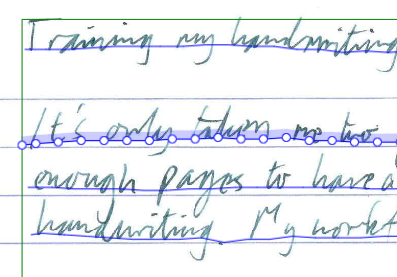
It’s only taken me two years, but I’ve finally got around to transcribing enough pages to have a first try at training a model on my own handwriting. My workflow has been (roughly) this:
If it seems like I haven’t posted here much lately then you’re right. Here’s a few bits and pieces I thought I’d share.
I’ve been learning a lot about nix (the package manager) and NixOS (the Linux distribution) lately, and enjoying the consistency and stability it brings. The whole machine’s setup and my user config can all be specified in nixlang and applied reproducibly and consistently on multiple computers. The configuration is declarative: instead of specifying the steps to configure the system (install this package, modify that file) I specify the desired state of the system (these packages are available, these apps are configured like this) and nix updates the actual state accordingly. I can also specify isolated, reproducible environments for individual projects, and deploy services to the cloud, using the same tooling. The language grammar is simple, but the way it’s interpreted takes a bit of getting used to and I’m finding my appreciation of its elegance growing as I understand it more. This website is now built and deployed using nix!
Just a quick note to say that since I’ve deleted my Twitter account, I’ve set up a static archive of all my tweets. Yes, even those embarrassing first ones.
This was made possible by Darius Kazemi: https://tinysubversions.com/twitter-archive/make-your-own/
You can still find me on Mastodon as @petrichor:digipres.club or via any of the other links at the bottom of the page.